What if you never had to worry about an AI company reading your conversations again?
No subscription. No cloud. No data leaving your device. Every prompt you type, every image you upload, every answer you get — all of it stays right on your machine.
That is not a future concept. That is what Google just made available to anyone with a laptop through Gemma 4, their brand-new family of open AI models. And whether you are a developer, a teacher, a marketer, or just someone who is tired of paying for AI tools that also mine your data, this guide will show you exactly how to get it running — step by step.
What Is Gemma 4?
Gemma 4 is a family of open-weight AI models built by Google DeepMind. Think of it as a compact, portable version of the technology that powers Google’s Gemini — except instead of running on Google’s servers, it runs directly on your computer.
When you use ChatGPT, Claude, or Gemini online, your questions and data travel to a remote server somewhere in the cloud. The company processes your input, generates a response, and sends it back. That is how cloud AI works. Gemma 4 flips that model entirely.
With Gemma 4 running locally, there is no server involved. You type a prompt, your own hardware processes it, and you get an answer — without a single byte of your data leaving your machine.
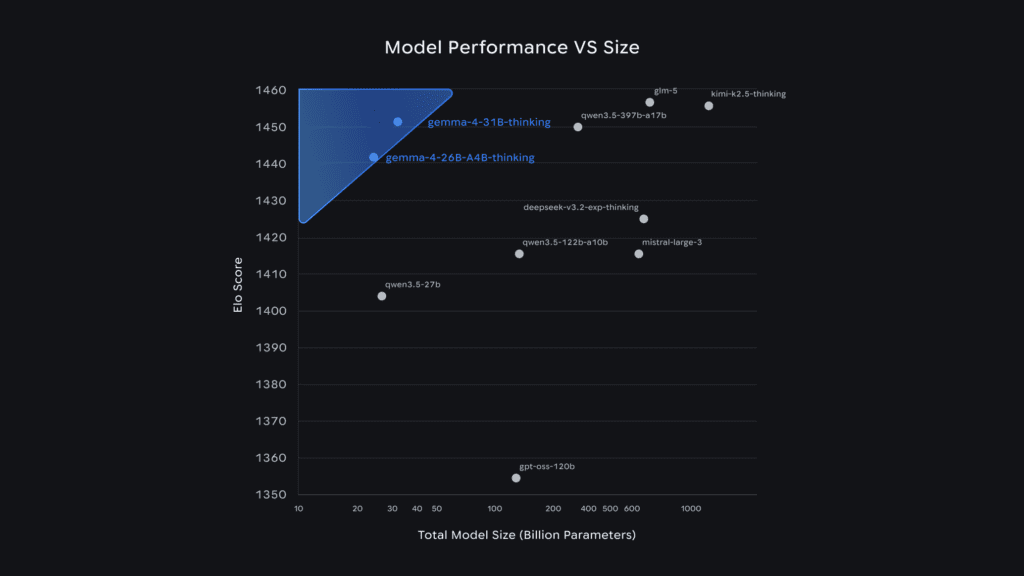
It is built from the same research foundation as Gemini 3, which means you are getting genuine frontier-class intelligence, not a watered-down offline alternative. The difference is simply where the computation happens.
Why Gemma 4 Is a Game-Changer for AI Users
Local AI has been theoretically possible for a while. What makes Gemma 4 different is the combination of quality, accessibility, and cost that it delivers simultaneously.
Complete Privacy
When you run Gemma 4 locally, your data stays on your device. Period. There are no terms of service to worry about regarding data retention, no risk of your sensitive business information being used to train future models, and no audit trail sitting on someone else’s server. For professionals handling confidential documents, legal information, financial data, or personal client details, this is not a nice-to-have — it is essential.
Completely Free
There is no API key. No monthly subscription. No usage limits tracked by a billing dashboard. You download the model once, and you can use it as many times as you want, for as long as you want, at zero ongoing cost. For SaaS founders and developers who regularly pay hundreds of dollars a month in AI API costs, this changes the math on what is economically viable to build.
Works Without an Internet Connection
Once Gemma 4 is installed, it runs entirely offline. This matters more than people initially realize. Traveling without reliable WiFi? Working in a facility with restricted internet access? Building an application that cannot depend on third-party API uptime? Gemma 4 handles all of those scenarios without compromise.
Gemma 4 Model Sizes Explained
Gemma 4 is not a single model — it is a family of four, each designed for different hardware and use cases. Choosing the right one matters because picking a model too large for your machine will result in painfully slow responses.
E2B (Effective 2B)
The smallest model in the lineup, designed for phones, tablets, and resource-limited laptops. It can run on as little as 5 GB of RAM, making it the most accessible option for older or budget hardware. Despite its size, it still processes images and audio natively — a capability that larger models from competing families do not offer at this scale.
E4B (Effective 4B)
A step up from the E2B with better reasoning quality while still running comfortably on most modern computers. This is the recommended starting point for most users. If you have a laptop purchased in the last three to four years with 8 GB of RAM, start here. You will get a genuine sense of what Gemma 4 can do without pushing your hardware.
26B MoE (Mixture of Experts)
This is where things get interesting for power users. The 26B MoE is a large model that uses a technique called Mixture of Experts, which means it only activates a portion of its total parameters during any given inference pass. The practical result is that it punches well above its weight — delivering quality comparable to much larger models while consuming fewer computational resources. You will want 16 to 20 GB of RAM for this one, ideally with a dedicated GPU.
31B Dense
The flagship model, designed for maximum quality on high-end hardware. If you have a machine with 20 or more gigabytes of RAM or a dedicated GPU, the 31B Dense delivers the best results in the family and is the top choice for fine-tuning and complex reasoning tasks.
Pro Tip: If you are not sure which to choose, start with the E4B. It runs on most modern computers and gives you a clear picture of Gemma 4’s capabilities before you invest time in setting up a larger model.
How to Try Gemma 4 Right Now — No Installation Required
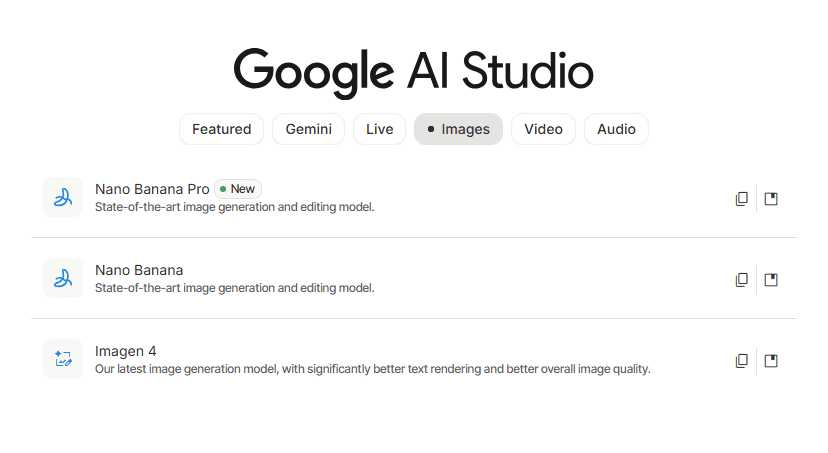
Before you install anything, Google gives you a fast way to test Gemma 4 directly in your browser through Google AI Studio. This takes about sixty seconds to set up.
Step 1: Go to Google AI Studio
Navigate to ai.google.dev/studio. You will need a free Google account to sign in, but there is no payment required.
Step 2: Select Gemma 4 as Your Model
Once you are inside, look for the model selector — it may appear as a panel on the side or as a dropdown at the top of the interface. Click on it and look for the Gemma 4 options. You will see both the 26B and 31B variants available for browser-based testing.
Step 3: Try Some Prompts
Here are a few prompts that demonstrate the range of what Gemma 4 can do in the browser:
- “Explain how a mortgage works to someone who has never bought a house. Keep it simple and practical.”
- “Write a professional but friendly email declining a meeting invitation due to a scheduling conflict. Keep it short.”
- Upload an image of a receipt or document and ask: “What information is shown in this image? Summarize the key points.”
The browser version is a great way to evaluate the model before committing to a local setup. Once you are ready for the full offline experience, the next step is installation.
How to Run Gemma 4 Locally: Step-by-Step Guide
Running Gemma 4 on your own computer requires one tool: Ollama. Ollama is a free, open-source application that makes downloading and running large AI models simple — no coding experience required.
Step 1: Download and Install Ollama
Go to ollama.com and download the version for your operating system.
- Windows: Download the installer, run the .exe file, and follow the standard next/next/finish installation prompts.
- Mac: Download the zip file, unzip it, and drag the Ollama app into your Applications folder.
- Linux: Open your terminal and run the single install command provided on the Ollama website.
Once installed, open Ollama. It will appear in your applications like any other program.
Step 2: Download the Gemma 4 Model
You have two options for downloading the model.
Option A — Through the Ollama App Interface: Open the Ollama app, click the model selector, and search for “Gemma 4.” You will see a download button beside the model name. Click it to begin the download.
Option B — Through the Command Line: Open your terminal or command prompt and type:
ollama pull gemma4This downloads the default Gemma 4 model. If you want a specific size variant, use the corresponding command:
ollama pull gemma4:31b
ollama pull gemma4:e2b
ollama pull gemma4:26b
The default model is approximately 9.6 GB, so give it a few minutes depending on your connection speed. Once complete, you will see a success confirmation.
Step 3: Start Chatting
Once the download finishes, you can interact with the model directly in the Ollama app interface. It looks and works like any other chat tool — there is a message input box, you type your prompt, and responses appear in real time.
Alternatively, you can run the model from the command line:
ollama run gemma4This launches an interactive session directly in your terminal. Type your prompt, press enter, and watch it work. When you are finished, type /bye to exit.
Pro Tip: If you have a dedicated GPU, Ollama will automatically use it for inference, which significantly speeds up response times. Even on CPU-only hardware, Gemma 4 still works — it just takes a bit longer.
Real-World Use Cases: What Gemma 4 Can Actually Do
Here are practical examples drawn from real testing of Gemma 4 running locally.
Writing Assistance
Ask Gemma 4 to draft a parent-friendly explanation of why screen time limits matter for children aged 8 to 12, and it returns a clear, organized response in seconds — no jargon, just practical language that a parent can actually use.
Need a professional email? Ask it to write a friendly but firm message declining a meeting due to a scheduling conflict, and it will produce multiple short, ready-to-send options.
Image Analysis
Drag a photo of a receipt, a chart, a screenshot, or a handwritten note into the Ollama app and ask what it shows. Gemma 4 reads the image and summarizes the key information accurately. This works for documents, data visualizations, forms, and a wide range of visual content.
Code Generation
Ask Gemma 4 to write a simple HTML page with a button that changes the background to a random color on each click, with the CSS and JavaScript included in the same file. It generates working code that you can paste directly into a file, save as an HTML document, and run in your browser immediately.
Problem Solving and Reasoning
Gemma 4 can work through multi-step logic problems, showing its reasoning clearly. For example, when given a bus-and-van transportation optimization problem — asking how to transport exactly 450 students at minimum cost with no empty seats — it breaks down cost per student, works through the arithmetic, and explains its logic step by step.
Research and Explanation
Ask it to explain complex topics in plain language: how compound interest works, what a specific contract clause means, how a particular piece of code functions. Gemma 4 is consistently clear, structured, and practical in its explanations.
[Internal link suggestion: See our guide on “Best AI Tools for Content Creators in 2026”]
Performance and Limitations: What to Expect
It is important to set honest expectations before you dive in.
Performance depends on your hardware. A machine with a dedicated GPU will generate responses in a few seconds. A CPU-only machine will take longer — sometimes 30 seconds or more for complex prompts on larger models. The E4B model is the best balance of speed and quality for most hardware setups.
Reasoning has limits. In testing, Gemma 4 solved a complex transportation optimization problem correctly in terms of the arithmetic, but initially interpreted the “no empty seats” constraint differently than intended. When pushed, it acknowledged the alternative solution. This kind of nuanced edge case is where the model can occasionally take a less direct path to the right answer. For the vast majority of everyday tasks, this is not a meaningful limitation.
Context window matters. The E2B and E4B models support a 128K token context window. The 26B and 31B models support 256K tokens. For most use cases, both are more than sufficient — but very long document analysis will perform better on the larger models.
No real-time information. Gemma 4’s training data has a cutoff date, and since it runs offline, it cannot browse the internet for current events or recent information. It is a knowledge and reasoning tool, not a news feed.
Who Should Use Gemma 4?
Gemma 4 is not just for developers. Here is a breakdown of who stands to benefit most.
Developers and SaaS Builders: Gemma 4 eliminates API costs entirely for use cases where local inference is acceptable. If you are building an internal tool, a desktop application, or a privacy-sensitive product, running Gemma 4 locally can transform your cost structure.
Educators and School Administrators: The ability to generate clear explanations, draft professional communications, and analyze documents without sending student or institutional data to a third-party server is a meaningful advantage for education environments.
Privacy-Focused Professionals: Lawyers, accountants, healthcare practitioners, and anyone handling confidential client information can use Gemma 4 without worrying about data retention policies or compliance risk.
Marketers and Content Creators: Gemma 4 handles writing tasks well — from email drafts to explanations to structured content outlines — with no monthly fee eating into your margins.
Offline Workers: Field technicians, researchers working in remote locations, or anyone who regularly operates in low-connectivity environments gets a capable AI assistant that works anywhere.
[Internal link suggestion: See our post on “How to Build a Privacy-First AI Stack in 2026”]
Gemma 4 vs. ChatGPT, Claude, and Gemini Online
The most important distinction is not about quality — it is about architecture.
ChatGPT, Claude, and Gemini are cloud-based services. Your data goes to a server, gets processed, and comes back. Those services offer the benefit of always being current, regularly updated, and running on infrastructure far more powerful than your laptop.
Gemma 4 is local. It runs on your hardware, uses your electricity, and keeps your data entirely on your machine. The trade-off is that you are limited by your own hardware’s speed, and the model’s knowledge is fixed at its training cutoff.
For tasks involving sensitive information, offline environments, or ongoing API costs that are becoming unsustainable, Gemma 4 is not just a viable alternative — it is the better choice.
The Future of Local AI
What Gemma 4 represents goes beyond a single model release. It signals a broader shift in how AI will be deployed over the next several years.
The trend is clear: AI capabilities that once required data centers are increasingly running on consumer hardware. Smartphones are already powerful enough to run 2B parameter models. Laptops handle 4B to 8B models without breaking a sweat. The compute gap between cloud and local is closing faster than most people realize.
For SaaS founders, this creates entirely new product categories. Imagine building an AI-powered application where your users’ data never touches your servers at all — where the AI runs client-side, completely on the user’s own device. That was not commercially realistic two years ago. With Gemma 4 and tools like Ollama, it is a viable architecture today.
For enterprises, local AI means compliance-friendly deployment without expensive air-gapped infrastructure. For individuals, it means genuine privacy without sacrificing capability.
The shift toward offline AI tools is not a niche trend. It is the next phase of how AI gets integrated into real-world workflows.
Conclusion: It Is Time to Try Local AI
Gemma 4 makes a compelling case that local AI is no longer a compromise. It is a serious, capable alternative to cloud-based AI tools — and for many use cases, it is the smarter choice.
Here is what you should do today:
- Go to Google AI Studio and test Gemma 4 in your browser. No installation, no commitment — just a few prompts to see what it can do.
- If you like what you see, install Ollama from ollama.com. It takes less than five minutes.
- Pull the E4B model for a solid starting experience on most computers, or jump straight to the 26B MoE if you have the hardware for it.
- Try it on a task you do regularly — drafting emails, explaining documents, generating code, or analyzing images.
The best way to understand what local AI can do for your work is to run it yourself. And with Gemma 4, the barrier to doing that has never been lower.
[Internal link suggestion: See our guide on “Top Free AI Tools Worth Using in 2026”]
Frequently Asked Questions
Is Gemma 4 completely free to use? Yes. Gemma 4 is released by Google under an Apache 2.0 open-source license, which means it is free to download, use, and even modify for commercial purposes. There is no subscription, no API key required for local use, and no usage limits. You pay nothing beyond the electricity your computer uses to run it.
What computer do I need to run Gemma 4 locally? The E4B model — the recommended starting point — runs on most modern computers with 8 GB of RAM. The smaller E2B model can run on as little as 5 GB of RAM. For the 26B MoE model, you will want 16 to 20 GB of RAM, ideally with a dedicated GPU. The 31B Dense model requires at least 20 GB of RAM or a high-end GPU for comfortable performance.
Does Gemma 4 work without an internet connection? Once you have downloaded the model, it runs entirely offline. No internet connection is required during use. Your data never leaves your machine, making it a strong choice for privacy-sensitive applications or environments with restricted internet access.
How does Gemma 4 compare to ChatGPT or Claude? The core difference is where computation happens. ChatGPT and Claude are cloud services that process your input on remote servers. Gemma 4 runs locally on your own hardware. Cloud models are generally faster and more up to date, while Gemma 4 offers complete data privacy, zero ongoing cost, and offline availability. For many professional and privacy-sensitive use cases, Gemma 4 is the more practical choice.
Can Gemma 4 understand images and audio? Yes. All four Gemma 4 models can process text and images natively. The smaller E2B and E4B models additionally support audio input — handling speech recognition and translation without needing a separate model or a cloud API call. This makes them particularly useful for building voice-capable offline applications.
Authority references for editorial use: Google DeepMind official Gemma 4 release documentation, Ollama official documentation, Google AI Studio product page, Google AI for Developers model card, Hugging Face Gemma 4 technical overview.